
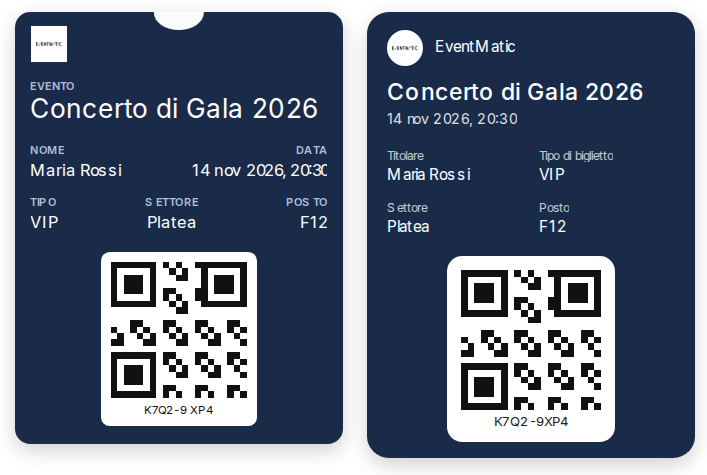
With EVENTMATIC the ticket goes straight to the attendee’s phone: a pass for Apple Wallet and Google Wallet in the organiser’s and the event’s own branding and, for seated events, with the seat written exactly as it appears on the floor plan. The email with the pass is sent automatically after each registration.
For an attendee the ticket is the first thing they see of an event, and often the last thing they look for before walking in: in their inbox, among downloaded PDFs, in screenshots. With EVENTMATIC the pass is sent automatically after registration through the web form, by email and as a PDF, with “Add to Google Wallet” and “Add to Apple Wallet” buttons: the ticket sits in the phone’s wallet, ready to show at the door.
Your event’s branding, not the supplier’s
Each organiser can give its passes its own look, with logo and icon, and change it for every single event: the annual conference, the gala dinner and the shareholders’ meeting can each have their own pass, all from the same platform. The event manager sets the design once; EVENTMATIC applies it to every pass.
The seat as it appears on the floor plan
For seated events the pass shows the seat exactly as it appears on the floor plan, for example “F12”: attendees know at once where to sit and staff in the hall do not need to check lists. On Google Wallet the pass updates itself if the seat changes; the QR code stays valid in any case.
How to enable it
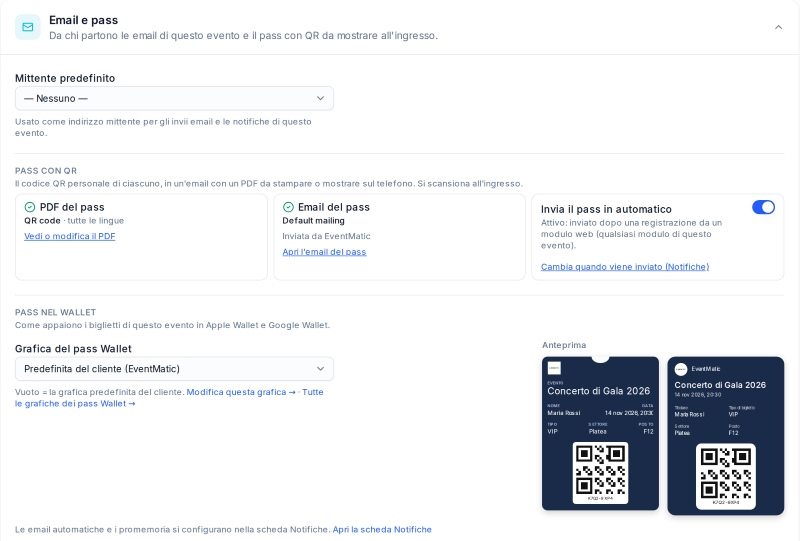
From the event page, with “Set up the QR pass”, the organiser prepares the pass email and chooses which PDF to send. The email goes out automatically after each registration through the web form (the sending time can be changed). The Wallet buttons are enabled from the email options and, with an event setting that is on by default, also appear on the form’s confirmation page and in the attendee’s “My agenda” area.
At the door
The Wallet pass carries the same QR code as the email and the PDF: it is read by the check-in app for Android smartphones (with the camera) or at the web check-in stations with a QR reader connected to the PC, or by typing the code, following the event’s access rules, hall by hall.
One platform for invitations, registration, tickets, seating, badges and access control: less paper, shorter queues at the entrance and a consistent image from the first invitation to the last hall.
Do you organise events with tickets or assigned seats? Book a free demo or contact us.